 ChessPuzzlePrint
Printable Chess Board
Print blank chess boards for note-taking, or paste a list of positions and get a sheet of diagrams — one to twelve boards per page.
What the printable chess board maker does
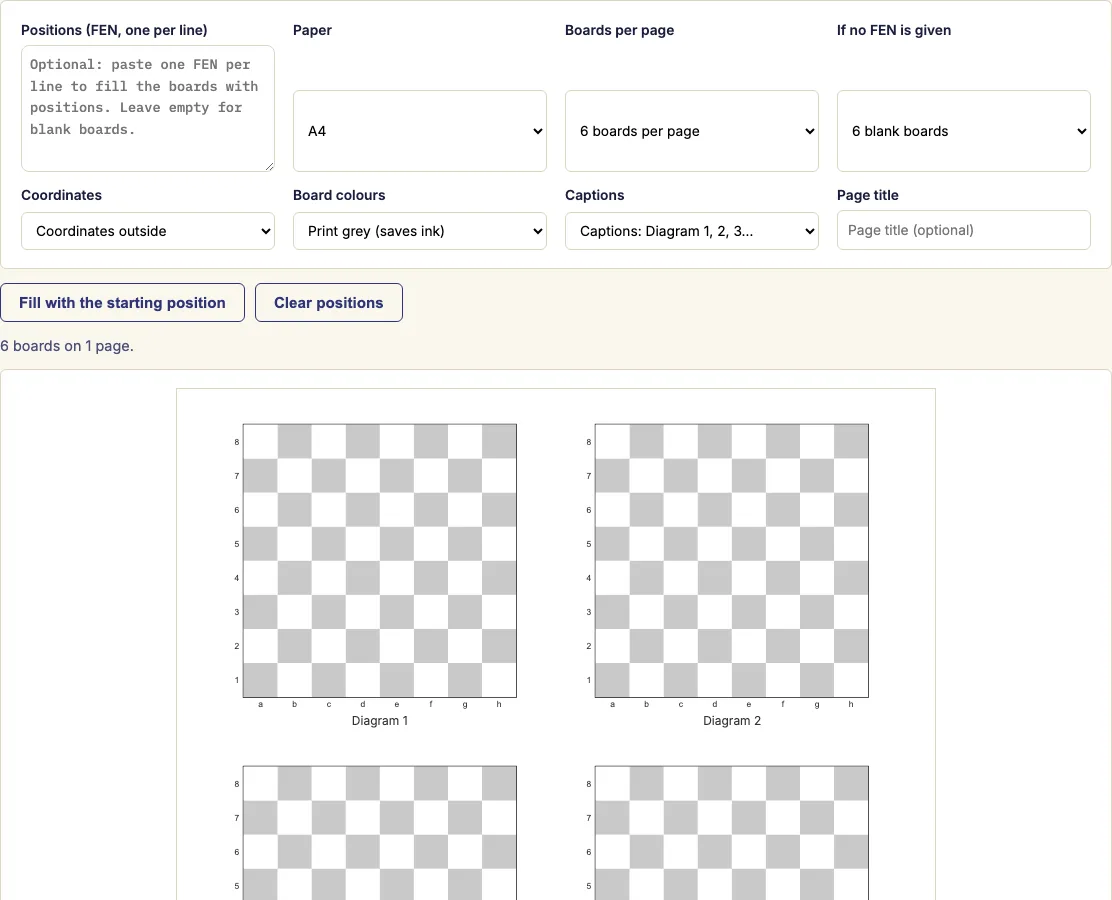
The printable chess board maker creates printable chess boards in your browser, for free. Leave the position box empty to print blank boards, or paste positions to print diagrams with the pieces already placed.
It suits coaches, teachers and authors who need a page of boards. Blank boards let students set up positions by hand. Diagrams let you hand out a set of positions to study or to annotate.
You choose how many boards fit on a page, whether the coordinates sit outside or inside the squares, and the colour scheme. When the sheet looks right, press "Print / save as PDF" to get a PDF you can print or keep. The tool builds the sheet from what you type, so you see the result as you work.
How to use the printable chess board maker
- For blank boards, leave the position box empty. Then choose how many blank boards you need.
- For diagrams, paste one FEN per line into the position box. A FEN is a short text code that describes one position. Most chess programs and websites can copy a position as FEN.
- Check the preview. A line that is not a valid FEN is drawn as an empty board and flagged above the preview, so you can fix it.
- To turn blank boards into starting-position diagrams you can edit line by line, press "Fill with the starting position".
- Choose boards per page: 1, 2, 4, 6, 9 or 12. Six boards per page gives a good balance of board size and number for classroom exercises.
- Choose your paper size, the coordinate placement and the colours. The grey "Print" scheme saves ink.
- Pick a caption style and, if you like, add a page title. Use numbered captions such as "Diagram 1" or "Exercise 1", or choose a writing line under each board for students to write their answers.
- Press "Print / save as PDF". The page breaks between sheets are handled for you.
You can set boards per page, paper size, coordinates, colours and captions before you print, so one sheet can serve a whole lesson. The boards you print here are free to use at home, in class or in products you sell, such as Etsy printables or KDP books.
What size does the printed board come out?
The board size depends on how many boards you put on a page. With one board per page, the board fills the printable width of the page, which makes it the largest option. Each step up in boards per page makes every board smaller, so 9 or 12 per page are for small diagrams rather than close study.
A chessboard always has 64 squares in 8 rows and 8 columns, and it is always square. The maker keeps every square square, so the grid never stretches. Its outer edge is set by the space each board gets on the page. Coordinates placed outside the squares take a little extra room, so choose inside coordinates if you want the board to use every bit of its space.
Where do I get a FEN for a position?
A FEN is a single line of text that describes one position, including whose turn it is. Most chess programs and websites can copy a position as FEN, so you can usually take it straight from the game or puzzle you are working on. If you do not have one, set up the position in the chess board editor and copy its FEN. Paste one FEN per line into the position box, because each line fills one board on the page.
Can I print several boards on one page?
Yes. Choose 1, 2, 4, 6, 9 or 12 boards per page, and the maker arranges them in a grid. Every board on the page uses the same size, so a sheet of diagrams looks neat when it is printed.
Plan the layout around the task. Use 4 boards per page when students need to study each position closely. Use 6 when you want a handout with several exercises. Use 9 or 12 when you need a quick reference sheet and detail matters less. Captions and writing lines take up space, so allow for them when you choose the number of boards.
Examples
Questions and answers
Can I print a board with pieces?
Yes, but the pieces are drawn on the board from a FEN. Paste one FEN per line to print each position with its pieces in place. The sheet does not include separate pieces to cut out, so if you need a physical set, use a board printout and a real set.
Is this a 3D printable chess board?
No. The maker produces flat boards and diagrams that you print on paper or save as a PDF. It does not make models for 3D printers.
Can I print the board from Black's side?
The sheet always draws White at the bottom. For a Black-at-the-bottom diagram, use the FEN to diagram tool and choose that orientation.
Why does one of my boards look empty?
A line that is not a valid FEN is drawn as an empty board and flagged above the preview. Check that line against your FEN source, correct it, and the board will show the position.
Is the tool free, and is my data sent anywhere?
The tool is free to use. The sheet is built in your browser from what you type, so it keeps working while the page is open, and nothing is sent to a server.
How do I keep my sheet for later?
Copy the link to save the whole sheet, including the positions you pasted. Open the link later to pick up where you left off.
Can I sell the printable chess boards I make here on Etsy or in a KDP book?
Yes. The boards and diagram sheets you create are royalty-free for personal, classroom and commercial use, including Etsy printables, KDP books, Teachers Pay Teachers and print-on-demand. No credit is required, and the only thing you may not do is copy this generator itself to run a competing service.
Related chess tools
Updated