 ChessPuzzlePrint
PGN to GIF Converter
Paste a game in PGN and get an animated GIF of it, one frame per move, ready to post or send.
What the PGN to GIF converter does
This PGN to GIF converter turns a chess game written in PGN notation into an animated GIF that shows every position in order. It works as a chess GIF maker: paste the moves, press one button, and download a file you can post anywhere. The tool is free and runs in your browser, and the game is not uploaded.
Each move is shaded in yellow, so viewers can follow what changed on every turn. You control the board size, the speed, the board colours and the orientation, and you can add a caption with the player names and the result. The finished file is an ordinary image, so people can open it without any chess software.
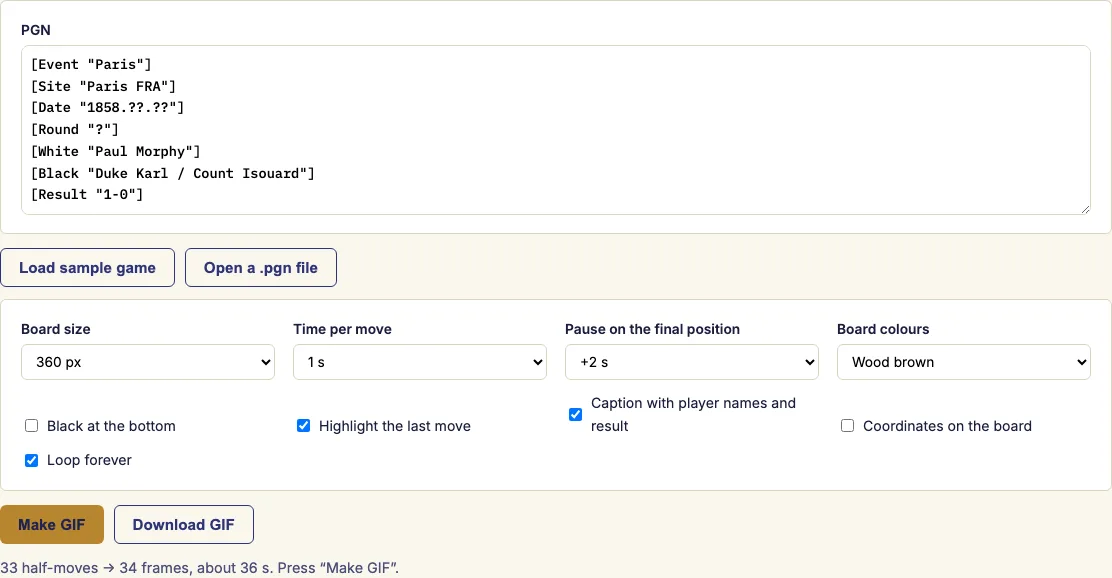
How to use the PGN to GIF converter
- Paste the PGN into the box, or open a .pgn file. If the file holds several games, pick the one you want from the list.
- Choose the board size, from 240 to 600 pixels. Then set how long each move stays on screen and the extra pause on the final position.
- Pick the board colours. Tick the options you need: Black at the bottom, last-move highlight, caption, coordinates and looping.
- Press "Make GIF". The status line counts the frames while they are drawn.
- Check the preview, then press "Download GIF" to save the file.
After the GIF is made, the status line shows its size in kilobytes. If the file is too large, try a smaller board or fewer moves. For social media, 360 or 480 pixels with 1 second per move gives a good balance between clarity and file size. Untick "Loop forever" if you want the animation to stop on the final position after one play-through.
To shorten a long game, paste only the moves from the critical moment, with a [FEN] tag for the position where they start. Ticking "Black at the bottom" shows the board from Black's side, which suits a game you want to present from that player's view.
How do I turn a chess game into a GIF?
Paste the game's PGN and press "Make GIF". The tool draws the board for the starting position, then one board after each half-move, and joins them into a single animation. A game of 40 moves each therefore produces about 81 frames.
The GIF format can hold at most 256 colours. The tool builds one palette from the board, the pieces and the highlight, and uses it for every frame. This keeps the colours steady from frame to frame and keeps the encoding quick.
How long is each frame?
Each move stays on screen for the time per move you set, and the final position is held for the extra pause you choose. Delays in a GIF are stored in hundredths of a second, so the values you pick are used as given. The shortest choice is half a second.
Some apps and browsers play very short delays more slowly than you set them. If an animation looks rushed in one viewer, increase the time per move and convert again.
Can I share the GIF anywhere?
Yes. An animated GIF plays anywhere an image can go, including a chat message, a club newsletter, a forum post or a slide. Viewers need no chess software to see the moves.
The pieces are drawn with a subset of the Noto Sans Symbols 2 font, which is released under the SIL Open Font License. Because of that licence, you can share the GIF without giving attribution.
Is my game uploaded?
No. Everything happens in your browser, so the game is not uploaded. The conversion runs on your own device from the PGN you paste or open.
Can I add a caption with the names and the result?
Yes. Tick the caption option and the player names and the result appear under the board. Coordinates can be shown as well, and the board colours and the side at the bottom are chosen before you press "Make GIF".
Examples
Sample game: Paul Morphy – Duke Karl / Count Isouard, 1-0
33 half-moves → 34 frames
1 s per move, +2 s on the final position
Running time 36 s
Board sizes: 240, 360, 480, 600 px
1. f3 e5 2. g4 Qh4# 0-1

Start        1.5 s
1. f3        1.5 s
1... e5      1.5 s
2. g4        1.5 s
2... Qh4#    4.5 s
Total 10.5 s
Questions and answers
How long is each frame?
Each move lasts for the time per move you set, and the final position stays for the pause you choose. The shortest setting is half a second, so you can make a quick replay or a slower one.
Can I share the GIF anywhere?
Yes. Post it in a chat, a newsletter, a forum or a presentation slide, and viewers need no chess software to watch it.
Is my game uploaded?
No. The conversion runs in your browser, and the game is not uploaded.
Why does the status line say the game was cut?
GIFs are limited to the first 300 half-moves (150 moves each) so the file stays a reasonable size. To keep the important part of a long game, paste only the moves from the critical moment, with a [FEN] tag for the position where they start.
Does the GIF start from the opening position?
Only if the PGN has no FEN tag. If it has a [FEN "…"] tag, the first frame shows that position, and the animation plays the moves from there.
Can I choose the board colours?
Yes. Pick the board colours in the form before you press "Make GIF". The tool then builds one palette from the board, the pieces and the highlight, and the same palette is used for every frame.
Related chess tools
Open-source components used by this tool: chess.js (BSD-2-Clause); gifenc (MIT); Noto Sans Symbols 2 (chess pieces) (SIL OFL 1.1).
Updated