 ChessPuzzlePrint
PGN to FEN Converter
Paste a game in PGN and get the FEN of every position in it, ready to copy one at a time or all at once.
What the PGN to FEN converter does
The PGN to FEN converter turns a chess game written in PGN notation into FEN, the one-line text that describes a single chess position. Paste your game, and the tool plays through it in your browser and writes down the FEN after every move, so you do not have to set the board up by hand. You need these FENs when you want to place a position in a diagram, an analysis program, or a puzzle sheet. The tool reads ordinary PGN with tags, move numbers, comments, annotation symbols and side variations, and it handles files that contain several games. Each row of its table shows one position, from the starting position to the last move.
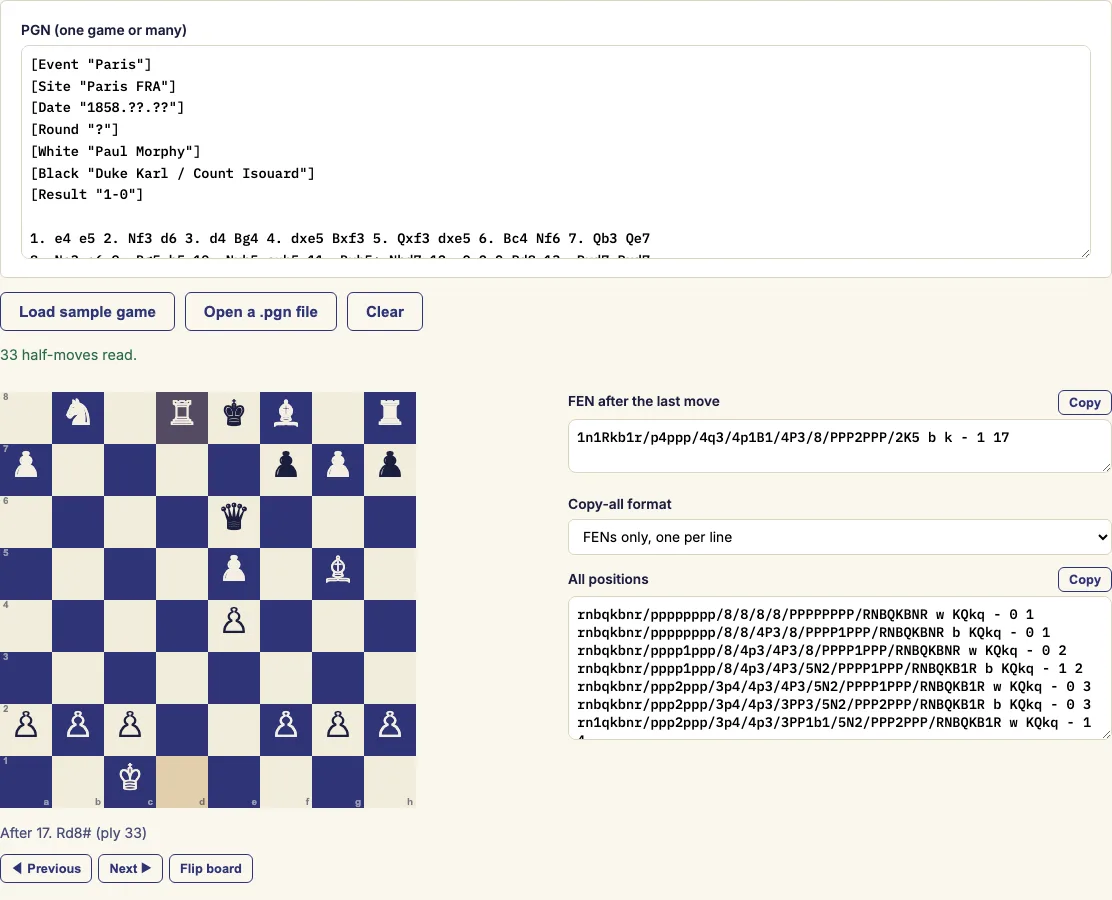
How to use the PGN to FEN converter
- Paste the PGN into the box, or open a .pgn file from your computer. The sample game is already loaded, so you can see the output straight away.
- If the text holds more than one game, choose the game you want in the "Game" list.
- Read the final FEN at the top right. It is the position after the last move.
- Click any row of the table to see that position on the board. Use the arrow keys to move up and down the table.
- Click the Copy button in a row to copy that position's FEN.
- To copy every position at once, pick a format under "Copy-all format", then click the Copy button of the "All positions" box.
Choose "Placement only" if you want just the piece layout. It is useful for comparing positions regardless of whose move it is. Short games are saved in the page address, so you can bookmark or share the link and get the same table back.
Arrow keys move up and down the table, so you can step through the positions without the mouse. Each row has its own Copy button, while the "Copy-all format" choice applies only to the "All positions" box. The status line tells you how many side variations were skipped.
How do I convert PGN to FEN?
PGN records a game as a list of moves, while FEN describes one position as a single line of text. The converter starts from the initial position, or from the position given in the [FEN] tag, and plays each move in order, writing down the FEN after it. You do not need to know the notation to use this, but it helps to know what the line contains.
A FEN has six fields separated by spaces. The first lists the pieces rank by rank, starting with rank 8, with digits for empty squares. The second shows whose move it is, the third shows the castling rights, and the fourth gives the en passant square. The fifth is the halfmove clock used for the fifty-move rule, and the sixth is the move number.
How do I get the FEN after a given move?
Each row of the table is one ply, which means one half-move. Ply 1 is White's first move, ply 2 is Black's reply, and so on. The row for ply 0 is the starting position. To find the position after White's move 12, look for ply 23. Black's reply to that move is ply 24. Clicking a row shows that position on the board, so you do not have to count moves by hand.
Does it read variations and comments?
It reads comments, annotation symbols and tags without any extra steps. It converts only the main line, though. Side variations are written in brackets, and those moves are skipped. The status line tells you how many side variations were skipped.
What if I only have a position, not a game?
You do not need a game for a single position. To check a FEN you already have, use the FEN viewer and validator. To start a game from that position, use the FEN to PGN tool. Both are listed under related tools below.
Examples
1. e4
rnbqkbnr/pppppppp/8/8/4P3/8/PPPP1PPP/RNBQKBNR b KQkq - 0 1
1... e5
rnbqkbnr/pppp1ppp/8/4p3/4P3/8/PPPP1PPP/RNBQKBNR w KQkq - 0 2
2. Nf3
rnbqkbnr/pppp1ppp/8/4p3/4P3/5N2/PPPP1PPP/RNBQKB1R b KQkq - 1 2
2... d6
rnbqkbnr/ppp2ppp/3p4/4p3/4P3/5N2/PPPP1PPP/RNBQKB1R w KQkq - 0 3
…
17. Rd8#
1n1Rkb1r/p4ppp/4q3/4p1B1/4P3/8/PPP2PPP/2K5 b k - 1 17
1. e4 e5 2. Nf3 Nc6 3. Bb5 a6 4. Bxc6 Qxc6

Move 4... Qxc6 could not be played: it is not a legal move in this position.
FENs listed: 8 (start + 7 moves)
Questions and answers
Is my game sent to a server?
No. The game is read and converted in your browser. Short games are placed in the page address only so that the link can be shared.
What happens if a move cannot be played?
The tool stops at the first move that cannot be played and names it, for example "Move 4... Qxc6". It still lists the FENs of all the moves before it. To continue past it, correct that move in the PGN, using the PGN editor if you like, and convert again.
Can I convert a game that starts from a set-up position?
Yes. If the PGN has a [FEN "…"] tag, normally together with [SetUp "1"], the game is played from that position, and the move numbers follow the FEN.
Can I load a .pgn file instead of pasting?
Yes. Open a .pgn file from your computer instead of pasting the text. If the file holds several games, choose one from the Game list. The file is read in your browser, the same as pasted text.
Why is there sometimes no en passant square in the FEN?
The tool writes an en passant square only when an en passant capture is actually possible in that position. The original FEN definition writes the square after every two-square pawn move. Both forms describe the same position for play.
Related chess tools
Open-source components used by this tool: chess.js (BSD-2-Clause).
Updated