 ChessPuzzlePrint
PGN Editor and Cleaner
Paste a PGN, choose what to strip, and get tidy PGN or plain move text such as “1. e4 e5 2. Nf3”.
What the PGN editor does
The PGN editor is a free, browser-based tool that cleans up chess game files in PGN format. It removes the parts you choose and rewrites the rest neatly, so a cluttered export becomes easy to read, paste, or share. It handles single games and whole files, and it can also output plain move text.
PGN exported from online play and analysis programs often includes a clock tag after every move, engine evaluations, annotation symbols, long side variations, and many tags you do not need. That makes the file hard to read and too long for a forum post or a chat message. This pgn editor chess tool strips out only what you select. The status line reports how much was removed, so you can see the effect before you copy or download the result.
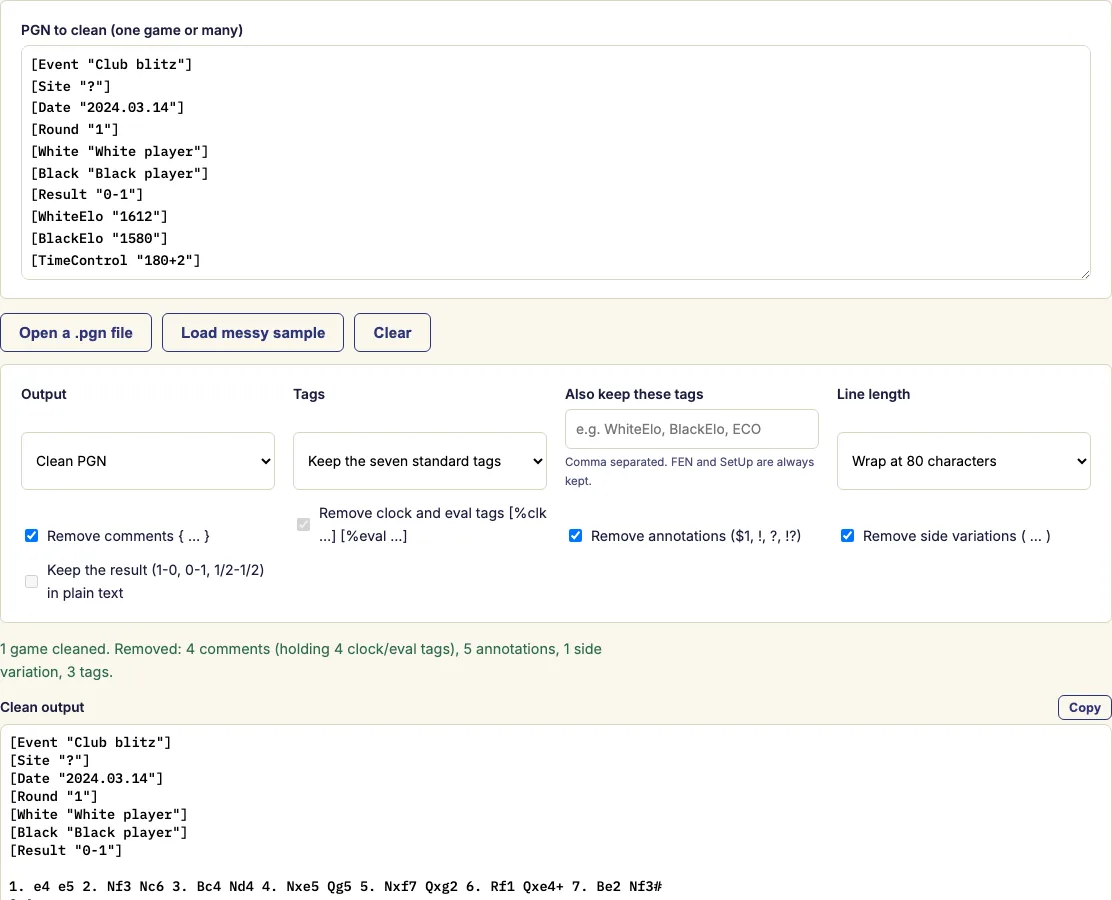
How to use the PGN editor
- Paste the PGN into the box, or open a .pgn file from your computer. A messy sample game loads automatically so you can see the effect at once.
- Choose the output: "Clean PGN" (tags and moves) or "Plain move text" (moves only).
- Tick what to remove: comments, clock and eval tags, annotation symbols, and side variations.
- For PGN output, choose which tags to keep: all of them, only the seven standard tags, or none. You can also list extra tags to keep, such as WhiteElo or ECO.
- Pick a line length, then copy the result or download it as a .pgn or .txt file.
Your choices are remembered in this browser, so they will be there the next time you visit. Whole files with many games are cleaned in one go, and the status line counts what was removed, so check it before you copy. Everything runs in your browser, so very large files take a moment to process.
Plain move text gives you just the numbered moves, one line per game or wrapped at the width you pick, ready for a worksheet, an email or a book manuscript. Games are split at each new tag block or after each result, cleaned one by one and joined with a blank line between them. Tick "Keep the result" if you want 1-0, 0-1 or 1/2-1/2 at the end.
How do I edit a PGN file?
You edit a PGN file in this tool by pasting it into the box or opening the .pgn file, then choosing what to remove and what to keep. The cleaner removes exactly the parts you select and rewrites the rest in a consistent layout.
A PGN file is plain text, so it can be opened in any text editor. Editing it by hand is slow, though, and a small slip can break a move. This tool works on the text and does not replay the moves. It also rewrites the move numbers from scratch, so Black's moves get the "12..." form where the standard needs it, even after variations and comments are gone.
How do I remove comments and clock times from a PGN?
Tick "Remove comments" and "Remove clock and eval tags" to delete both. Clock times such as [%clk 0:03:00] record the time left after a move, and [%eval 0.3] records an engine evaluation. Many programs write these commands inside PGN comments.
To keep your own comments but lose the clock times, untick "Remove comments" and leave "Remove clock and eval tags" ticked. Comments that held only a clock tag disappear, and the rest stay. You can also tick the annotation symbol option to remove ! ? !! ?? !? ?! and numeric glyphs such as $1 or $14.
Can it fix a broken PGN?
It can tidy a PGN that contains a mistake, because the cleaner does not check the moves against the board. It also corrects inconsistent move numbering, since those are rebuilt during cleaning. It does not confirm that every move is legal.
To check legality, load the result into the PGN viewer or the PGN to FEN converter. An illegal move will show up there.
Is my file uploaded?
No. Everything runs in your browser, so your PGN is processed on your own computer. Very large files take a moment to finish, but the process is the same.
Examples
1. e4 {[%clk 0:03:00]} e5 {[%clk 0:03:00]} 2. Nf3 {[%eval 0.3] [%clk 0:02:59]} Nc6
3. Bc4 Nd4?! $6 {Leaves e5 unguarded.} (3... Bc5 4. c3 Nf6) 4. Nxe5?? $4 Qg5! 5. Nxf7 Qxg2
6. Rf1 Qxe4+ 7. Be2 Nf3# 0-1

↓ clean PGN (default options)
1. e4 e5 2. Nf3 Nc6 3. Bc4 Nd4 4. Nxe5 Qg5 5. Nxf7 Qxg2 6. Rf1 Qxe4+ 7. Be2 Nf3#
0-11. e4 e5 2. Nf3 Nc6 3. Bc4 Nd4 4. Nxe5 Qg5 5. Nxf7 Qxg2 6. Rf1 Qxe4+ 7. Be2 Nf3# 0-1
[White "White player"]
[Black "Black player"]

1. e4 e5 2. Nf3 Nc6 3. Bc4 Nd4?! $6 {Leaves e5 unguarded.}
(3... Bc5 4. c3 Nf6) 4. Nxe5?? $4 Qg5! 5. Nxf7 Qxg2 6. Rf1
Qxe4+ 7. Be2 Nf3# 0-1Questions and answers
What are the seven standard tags?
Event, Site, Date, Round, White, Black and Result. The PGN standard calls them the Seven Tag Roster and asks for them in every exported game, so "only the seven standard tags" keeps a file valid while dropping the rest.
How do I turn a PGN into plain text?
Choose "Plain move text" as the output. The tags are dropped and you get only the numbered moves; tick "Keep the result" if you want 1-0, 0-1 or 1/2-1/2 at the end.
Does it check that the moves are legal?
No. The editor works on the text and does not replay the moves. Load the result into the PGN viewer or the PGN to FEN converter to check every move.
Will my settings be there next time?
Yes. Your choice of options is remembered in this browser for the next visit. The PGN itself is not uploaded anywhere.
Can I keep only some of the tags?
Yes. For PGN output, choose all tags, only the seven standard tags, or none, then list any extra tags to keep, such as WhiteElo or ECO. The [FEN] and [SetUp] tags are kept whatever you choose.
Does it keep the FEN and SetUp tags?
Yes. The [FEN] and [SetUp] tags are always kept. Without them, a game that starts from a set-up position would be read from the wrong position.
Related chess tools
Open-source components used by this tool: chess.js (BSD-2-Clause).
Updated