 ChessPuzzlePrint
FEN to PGN Converter
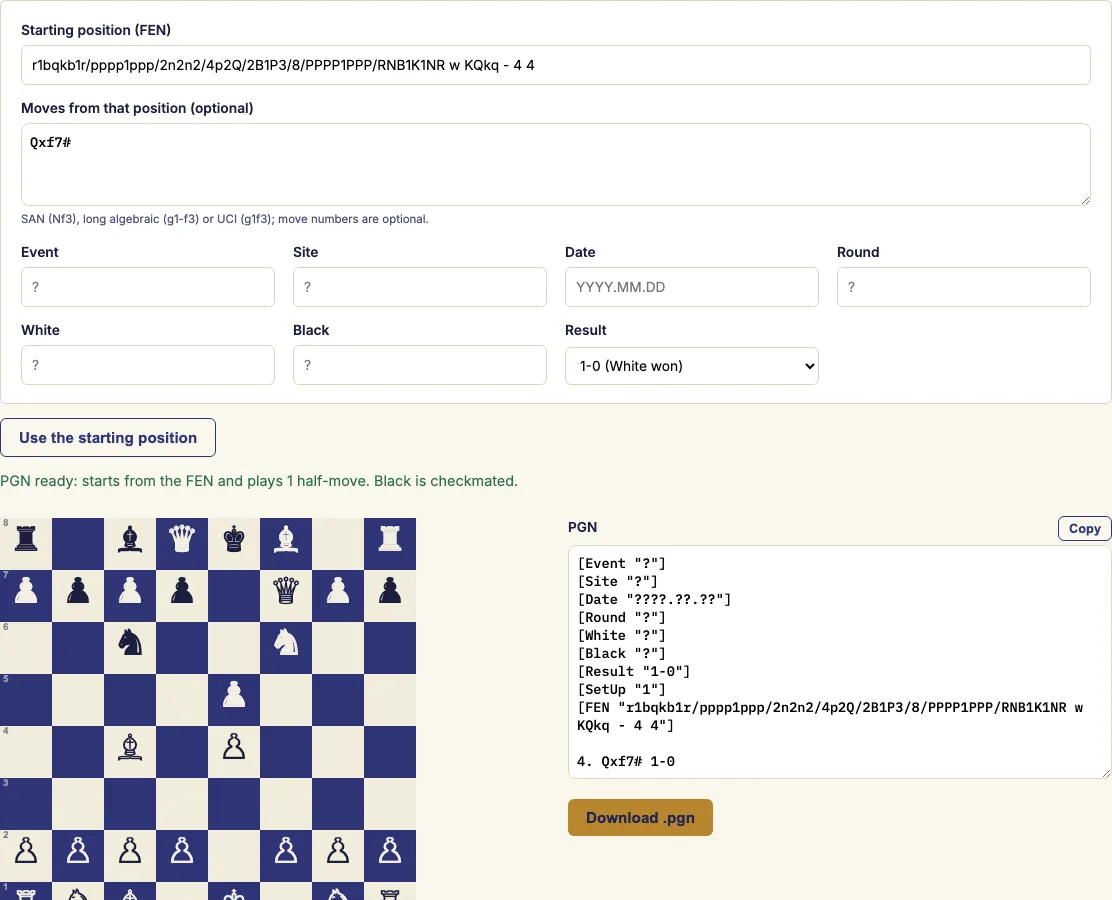
Paste a position as FEN, add the moves played from it if you like, and get a PGN file that any chess program can open.
What the FEN to PGN converter does
The FEN to PGN converter turns a FEN position into a PGN game that chess programs, scoresheet apps and websites can import. A FEN on its own describes one position, and many of those programs only import PGN, so this tool wraps the position in the tags they need.
You can stop at the position, or type the moves played from it in standard algebraic notation, long algebraic or UCI. Each move is checked against the position as it is entered. The seven standard tags are filled with your event, players, date and result, or left as "?" when you skip them. You can then copy the PGN or download it as a .pgn file.
How to use the FEN to PGN converter
- Paste your FEN into the "Starting position" box. The board appears as soon as the FEN is valid. If it is not, a clear message explains what is wrong.
- Optionally type moves played from that position, for example "Qxf7#" or "1... Kd5 2. e4+". Move numbers can be left out.
- Fill in the tags you know: event, site, date (YYYY.MM.DD), round, players and result. A tag you leave empty is written as "?".
- Check the PGN in the output box. If the moves end in checkmate, the status line says who is mated and which result the tag should show.
- Copy the PGN from the output box, or press "Download .pgn" to save it as a file.
- If you want an ordinary game from move one, press "Use the starting position" instead of entering a FEN.
Moves can be in standard algebraic notation (Nf3, exd5, O-O, e8=Q), long algebraic notation (Ng1-f3, e7-e8=Q) or UCI coordinates (g1f3, e7e8q). The tool writes every move in standard algebraic notation, and each move is checked against the position, so an illegal move cannot slip into the PGN.
Your FEN, moves and tags are kept in the page address. Bookmark the page and it brings back the same PGN later.
How do I convert FEN to PGN?
A FEN is converted to PGN by wrapping it in a game record that starts from your position instead of the normal starting setup. The tool builds this wrapper for you as soon as the FEN is valid.
A FEN records one position: piece placement, side to move, castling rights, the en passant square and two move counters. A PGN file records a game. Programs that import PGN expect a game, so a bare position cannot be loaded into them. Conversion means building a game whose first position is your FEN.
Before it writes anything, the tool runs the basic checks a chess program needs. The FEN must have six fields, exactly one king for each side, no pawns on the first or last rank, correctly written castling rights, and an en passant square on the right rank.
What are the SetUp and FEN tags?
The SetUp and FEN tags tell a reader or program that the game does not start from the normal position, and they give that starting position. The tool writes [SetUp "1"] together with [FEN "..."] whenever you enter a FEN.
The PGN standard says a game starts from the normal position unless SetUp is "1" and a FEN tag gives the position. Programs that read PGN look for these two tags, so both must be present for the position to load. The seven standard tags (Event, Site, Date, Round, White, Black and Result) are always written too. A question mark means a value you left empty, and ????.??.?? means an unknown date, which is the usual PGN convention.
Can I add moves after the position?
Yes. You can type moves played from the position in standard algebraic notation, long algebraic or UCI. The tool writes them all as standard algebraic notation in the PGN. If you only need the position, leave the move box empty.
Each move is checked against the position as it is played, so an illegal move is caught. The move number and side to move come from the last two FEN fields. A position with Black to move therefore starts with "40...", and PGN writes three dots after the move number whenever Black is to move.
Examples
[Event "Club training"]
[Site "?"]
[Date "????.??.??"]
[Round "?"]
[White "?"]
[Black "?"]
[Result "1-0"]
[SetUp "1"]
[FEN "r1bqkb1r/pppp1ppp/2n2n2/4p2Q/2B1P3/8/PPPP1PPP/RNB1K1NR w KQkq - 4 4"]

4. Qxf7# 1-0
[Event "?"]
[Site "?"]
[Date "????.??.??"]
[Round "?"]
[White "Study"]
[Black "Study"]
[Result "*"]
[SetUp "1"]
[FEN "8/8/4k3/8/8/3K4/4P3/8 b - - 0 40"]

40... Kd5 41. e4+ Ke5 42. Ke3 *
Questions and answers
Does the tool check my FEN before converting it?
Yes. It applies the basic checks a chess program needs, and a clear message explains anything wrong. For a fuller, field-by-field explanation of a problem, use the FEN validator.
Can I skip the move numbers?
Yes. Move numbers can be left out, and the tool takes the move number and side to move from the last two fields of your FEN.
Can I make a PGN with no moves?
Yes. Leave the moves box empty and the PGN holds only the starting position, with the SetUp and FEN tags and the seven standard tags. Use it when you only need the position in a file.
Which programs can read the output?
Many programs, scoresheet apps and websites import PGN, so the output can be loaded into them. It is a standard PGN game, with the tags that tell a reader the game starts from your position.
What date formats can I type?
You can type dates as 2024-05-01 or 2024/5/1. They are written in the PGN form 2024.05.01, and an unknown month or day is written as ??.
How are quotation marks in names handled?
They are escaped as the PGN standard requires, so a name like Ann "the Rook" B. is stored safely. Backslashes in names are escaped the same way.
Will the same PGN come back if I return to the page later?
Yes, if you bookmarked it. The page address keeps the FEN, moves and tags, so the bookmark restores the same PGN.
Related chess tools
Open-source components used by this tool: chess.js (BSD-2-Clause).
Updated