 ChessPuzzlePrint
Chess Worksheets Generator
Choose a tactic and a difficulty, and get a clean printable sheet of real puzzles from rated games — with an answer key in standard notation.
What the chess worksheet generator makes
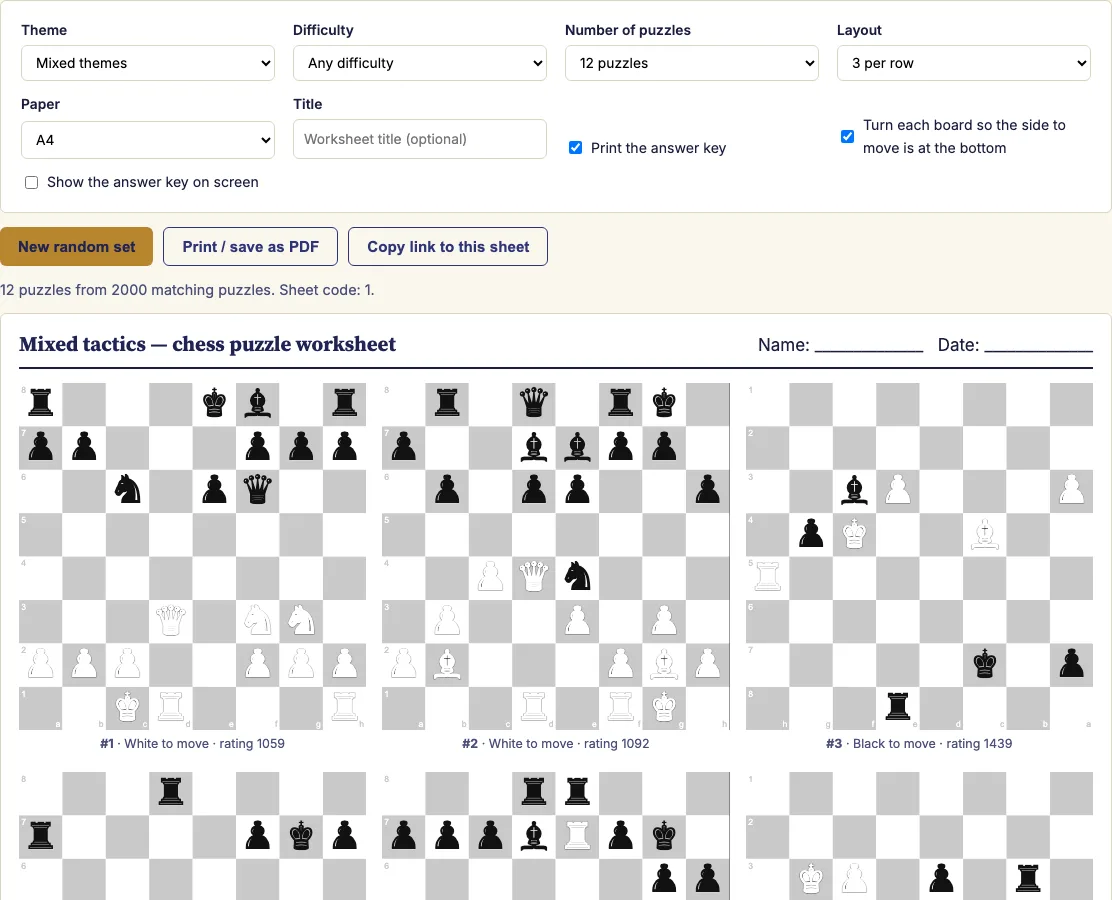
The chess worksheet generator on this page builds a printable set of chess puzzles right in your browser. You choose a theme and difficulty, pick how many puzzles you want, and it prepares a sheet of boards, with an optional answer key. Every puzzle is a real position from a rated game, not a made-up diagram, so the sheet works as a practical set of chess puzzle worksheets. You can print it or save it as a chess worksheet PDF, and nothing you select is sent to a server. Use it as a chess puzzle generator for a class, a family, or yourself. For chess worksheets for beginners, start with the Foundation band and move up as the solver improves.
How to use the chess worksheet generator
- Pick a theme, such as fork, pin, mate in 2 or back-rank mate, or leave it on "Mixed themes".
- Choose a difficulty band, or any difficulty. Foundation puzzles are rated 600–1199, Developing 1200–1599, Challenging 1600–1999, and Advanced 2000 and above.
- Choose how many puzzles you want (4 to 20) and how many boards per row.
- Optional: add a title, switch the answer key on or off, and decide whether boards are turned so the side to move is at the bottom.
- Press "Print / save as PDF." In the print dialog, choose "Save as PDF" to get a file, or send the sheet straight to your printer.
Three boards per row fits 12 puzzles on one A4 or US Letter page. Two per row gives larger boards for younger players. The page size is set in the print stylesheet, so choose the matching paper size in the print dialog and leave scaling at 100%. The boards are plain vector graphics in grey and white, so the sheet uses little ink. To get a different sheet with the same settings, press "New random set." To give a student or class the exact sheet you printed, copy the link from your address bar. It rebuilds the same puzzles in the same order. Everything you make here is free to use in class or in products you sell, such as Teachers Pay Teachers packs or KDP puzzle books.
How do I make a chess puzzle worksheet?
You set a theme and a difficulty band, choose the number of puzzles, and press print. The generator does the rest by filtering its collection, picking puzzles with a seeded shuffle, and sorting them from easiest to hardest.
The theme and band filters narrow the collection first. The seeded shuffle then picks the number you asked for. Because the shuffle is seeded, the same settings always give the same sheet. The final sort puts the easiest puzzles at the top, so the sheet builds up in difficulty. To build a progression, make one sheet per difficulty band on the same theme. Each theme also has a ready-made sheet linked from this page.
Can I turn the boards so Black is at the bottom?
Yes. In the options you can decide whether boards are turned so the side to move is at the bottom. This is a setting you choose before you print, and it applies to every board on the sheet.
Does it include answers?
Yes, the answer key can be switched on or off before you print. Each solution is written in standard algebraic notation, starting with the solver's first move.
Puzzle data begins with the opponent's last move. The boards already show the position after that move, so the key lists only the moves the solver and the opponent play from there. Print the sheet without the key for the solvers, and keep the key page for the person checking the answers.
How are the puzzles chosen and ordered?
The puzzles come from a collection of real positions taken from rated games. The generator filters that collection by theme and difficulty band, then uses a seeded shuffle to pick the number you asked for. It sorts the chosen puzzles from easiest to hardest. Because the sheet is built from the settings in the page address, a copied link rebuilds the same sheet.
Examples
Questions and answers
Are there chess worksheets for kids?
The generator has no separate kids' setting. For younger players, choose two boards per row, which makes the boards larger, and start with the Foundation band. Move up to Developing or Challenging as they get more confident.
Is anything sent to a server?
No. The page loads the puzzle list for your theme from this site and then builds the sheet entirely in your browser. Nothing you type or select is sent to a server.
Can I save it as a PDF?
Yes. Press "Print / save as PDF," then choose "Save as PDF" in the print dialog. The sheet is built in your browser, so the file is made on your own device.
Are the chess puzzle worksheets based on real games?
Yes. Every puzzle on the sheet is a real position from a rated game, not a made-up diagram. The puzzle list for your theme is loaded from this site, and the boards are drawn in grey and white, so the sheet uses little ink.
Can I get the same chess worksheet again?
Yes. Copy the link from your address bar and open it later or send it to someone else. It rebuilds the same puzzles in the same order. If you want a new set with the same settings, press "New random set."
Can I sell the chess puzzle worksheets I make here, for example on Teachers Pay Teachers or Etsy?
Yes. Every worksheet you generate is royalty-free for personal, classroom and commercial use, including Teachers Pay Teachers, Etsy printables, KDP puzzle books and print-on-demand. The puzzle positions are public domain, so nothing on the sheet needs a licence. No credit is required, and the only thing you may not do is copy this generator itself to run a competing service.
Related chess tools
Updated