 ChessPuzzlePrint
Chess Symbols: Copy and Paste
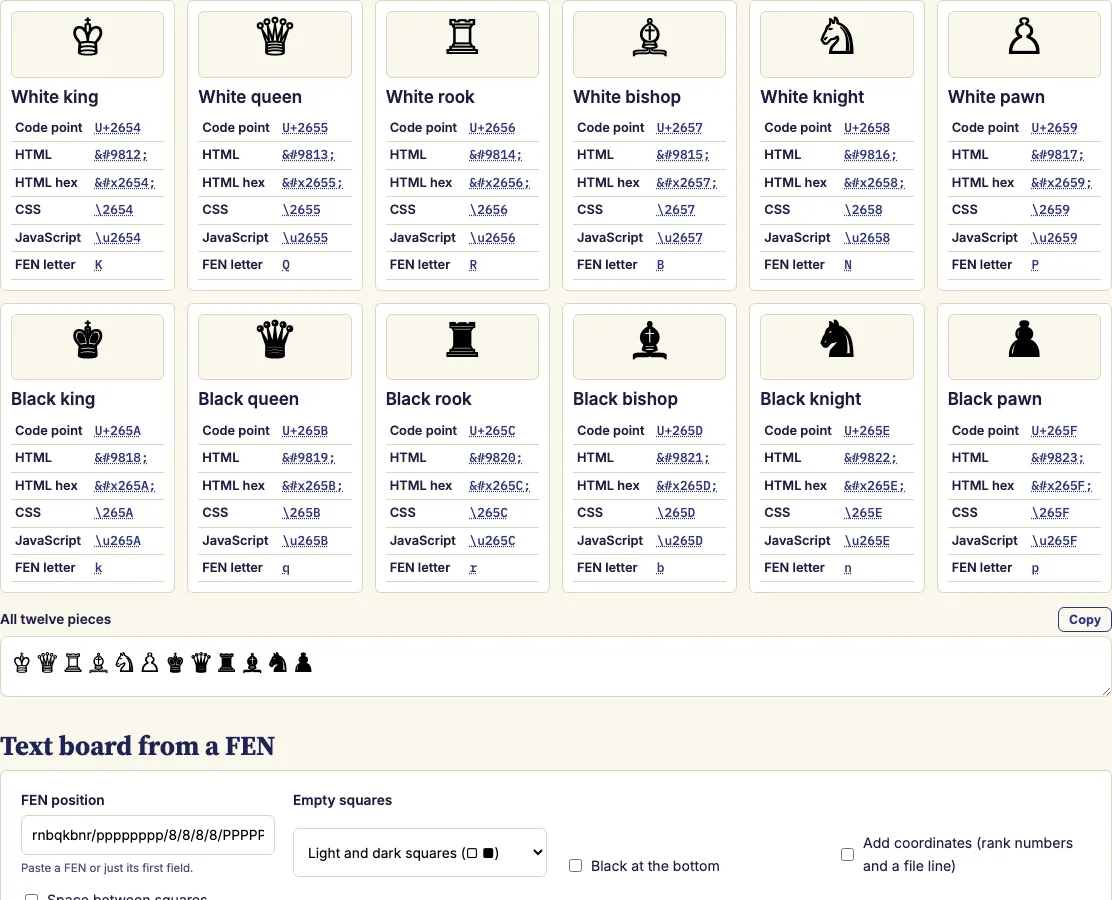
Click a piece to copy it. Each one comes with its code point and the codes for HTML, CSS and JavaScript.
Chess symbols in one click
The chess symbols tool on this page gives you all twelve Unicode chess pieces, six white and six black, ready to copy, shown large so you can find the one you need at a glance. Click a symbol to copy it, or copy the code for HTML, CSS or JavaScript when you cannot type the symbol directly. A converter below the list also turns any chess position written in FEN notation into an eight-line text diagram made of these symbols. Everything you copy is ordinary text that you can paste into chat messages, documents, spreadsheets and web pages, and most phones and computers have a font that shows the symbols.
How to use the chess symbols tool
- Find the piece you need among the large symbols at the top of the tool. Each piece appears once in white and once in black.
- Click a large piece to copy the symbol itself. To copy a code instead, click the code underneath it, such as the decimal or hexadecimal HTML entity, the CSS escape or the JavaScript escape.
- To copy the complete set, use the All twelve pieces box and copy it in one go.
- To make a text board, paste a FEN into the box below the symbols, or start from the starting position.
- Choose how empty squares look: white and black squares (□ ■), dots, or plain letters.
- Optionally add coordinates, put Black at the bottom or add spaces.
- Press Copy, then paste the board into your message.
A text board lines up only when every character has the same width. Chess symbols and square symbols often differ in width between fonts, so if alignment matters, choose the plain-letter style and view the board in a monospaced font.
For HTML, you can write a symbol directly in a UTF-8 page or use a numeric entity. HTML has no named entities for chess pieces, so ♔ and ♔ are the forms to use for the white king.
What are the symbols in chess?
Chess has twelve standard Unicode symbols, one for each piece in white and in black. They run from U+2654 (white king) to U+265F (black pawn). The white king is ♔ (U+2654), queen ♕ (U+2655), rook ♖ (U+2656), bishop ♗ (U+2657), knight ♘ (U+2658) and pawn ♙ (U+2659). The black pieces are U+265A to U+265F, so the black king is ♚ and the black pawn is ♟.
The symbols belong to the Miscellaneous Symbols block. The white pieces are drawn as outlines and the black pieces as filled shapes, and this difference stays visible when you change the text colour. The knight is often called the horse, so the chess horse symbol is ♘ in white and ♞ in black.
Unicode also has a separate block of extra chess symbols, including rotated and neutral pieces. Few fonts include them, so this tool sticks to the standard twelve.
How do I show a chess symbol with CSS?
Use the CSS escape inside a content value. For the white king, write content: "\2654"; and the symbol appears on the page without being added to your HTML text. The CSS escape for each piece is shown under its symbol in this tool, so you can copy it directly.
What do the chess annotation symbols mean?
Chess annotation symbols are marks that players add to a move to show its quality or to comment on what it does. They are placed directly after the move, with no space, so a strong move might be written as e4! and a checkmate as Qxf7#.
The common annotation symbols are:
Two other symbols are used in the move text itself. A plus sign (+) means the move gives check, and a hash sign (#) means it gives checkmate. Annotation symbols do not change how a move is played. They only record a judgement about it, so readers can follow a game without the commentary.
- ! a good move
- !! a brilliant move
- ? a mistake
- ?? a blunder
- !? an interesting move that may not be the best
- ?! a dubious move that may be weak
Examples
♔ ♕ ♖ ♗ ♘ ♙ ♚ ♛ ♜ ♝ ♞ ♟

♔  U+2654  ♔  ♔  \2654  \u2654
♟  U+265F  ♟  ♟  \265F  \u265F
♜♞♝♛♚♝♞♜
♟♟♟♟♟♟♟♟
□■□■□■□■
■□■□■□■□
□■□■□■□■
■□■□■□■□
♙♙♙♙♙♙♙♙
♖♘♗♕♔♗♘♖
8 r . b q k b . r
7 p p p p . Q p p
6 . . n . . n . .
5 . . . . p . . .
4 . . B . P . . .
3 . . . . . . . .
2 P P P P . P P P
1 R N B . K . N R
  a b c d e f g h
Questions and answers
Is there a chess emoji?
Yes, but there is only one official chess emoji. The Chess Pawn ♟️ was added in Emoji 11.0 in 2018. The other pieces are text symbols, and how they look depends on the font.
Is there a chess king emoji?
No. Only the black pawn is an official emoji, so the king is a text symbol too. Use the text symbol ♔ for white or ♚ for black from this tool instead.
What is the chess horse symbol?
The chess horse symbol is the knight. Use ♘ for the white knight and ♞ for the black knight. Both are text symbols, so they display in most places that accept plain text.
How do I type chess symbols?
Copy the symbol from this tool and paste it where you need it. To type a code by hand, use Character Map on Windows, Control-Command-Space on a Mac to open the Character Viewer, or Ctrl+Shift+U followed by the hexadecimal code on many Linux desktops. In HTML, write ♔ or ♔ for the white king.
Why do chess symbols look different on my phone?
Each device draws the symbols with its own font, so the shapes and sizes can vary. Some apps show the black pawn ♟ as a coloured emoji. If that happens, the plain-letter style in this tool avoids the problem.
Related chess tools
Open-source components used by this tool: ChessPieces font (Noto Sans Symbols 2 subset) (SIL OFL 1.1).
Updated