 ChessPuzzlePrint
Chess Piece Moves
Pick a piece, click a square and see exactly where it can move, with blockers and captures.
What this chess piece moves page does
The Chess Piece Moves tool shows how a single chess piece moves on a board, with dots on every square it can reach. It runs in your web browser, is free, and needs no sign-up. Pick a king, queen, rook, bishop, knight or pawn, place it on the board, and the tool marks where it can go. This guide explains how chess pieces move, from the basic pattern of each piece to the special moves that the tool does not show.
Everything runs in your browser, and the squares are calculated from the same rules for every piece, so you can compare one piece with another on the same square.
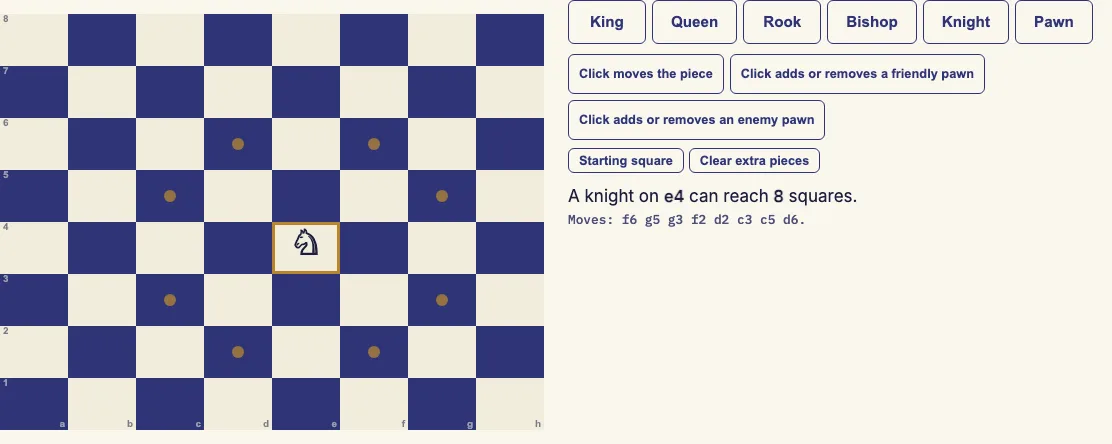
How to use the Chess Piece Moves tool
- Choose a piece with the King, Queen, Rook, Bishop, Knight or Pawn buttons.
- Click any square on the board. The piece appears there, and dots mark the squares it can move to.
- Click Starting square to put the piece on its usual starting square: king e1, queen d1, rook a1, bishop c1, knight b1 or pawn e2.
- To test blocking, set the click mode to "Click adds or removes a friendly pawn" and click a square. A white pawn of your own appears in the way, and the piece cannot move onto or past it.
- To test captures, set the click mode to "Click adds or removes an enemy pawn" and click a square. A black pawn appears, and the piece can capture it. The capture square is shown in red.
- If you chose the Pawn piece, use the menu to pick White pawn (moves up the board) or Black pawn (moves down the board).
- Click "Clear extra pieces" to remove the friendly and enemy pawns you added.
- Read the line under the board. It gives the number of squares the piece can reach and lists Moves, Captures and the squares blocked by your own pieces.
The piece, its square and any extra pieces are stored in the address bar. Copy the link to open the same board again.
How does each chess piece move?
Each piece has its own movement pattern. The king moves one square in any direction. The queen moves any distance along a rank, file or diagonal. The rook moves any distance along a rank or file, and the bishop moves any distance on a diagonal. The knight jumps in an L shape, and the pawn moves forward.
No piece can land on a friendly piece. A sliding piece (rook, bishop or queen) stops one square before a friendly piece, or on an enemy piece it can capture.
How does the knight move?
The knight moves two squares in one direction and then one square at a right angle, forming an L. It is the only piece that jumps over other pieces, so a piece in the way does not stop it. From e4 on an empty board it reaches 8 squares, and from a1 only 2.
How does the pawn move and capture?
The pawn moves forward one square. From its starting rank it may move two squares if both squares are free. A pawn on e2 can go to e3 or e4, but a pawn on e3 can only go to e4. A piece directly in front blocks it completely.
The pawn captures one square diagonally forward, never straight ahead. It cannot move or capture backwards.
Can the bishop move to any square?
No. A bishop moves only diagonally, so it stays on squares of one colour for the whole game. A bishop on a dark square can never reach a light square. From d4 on an empty board it reaches 13 squares, and from a1 it reaches 7.
How many squares can each piece reach?
These counts assume an empty board. From the middle of the board, the king reaches 8 squares, or 3 from a corner. The queen reaches 27 squares from d4 and 21 from a1. The rook always reaches 14 squares on an empty board. The bishop reaches 13 from d4 and 7 from a1, and the knight reaches 8 from e4 and 2 from a1.
The counts on this tool were checked against the chess.js move generator and by hand, so they match the rules.
What are the special moves?
The special moves are castling, en passant and promotion. Castling moves the king and a rook together. En passant is a special pawn capture. Promotion happens when a pawn reaches the last rank and becomes a queen, rook, bishop or knight.
The tool shows only ordinary piece movement and does not include these special moves.
Examples
Questions and answers
Can a piece jump over another piece?
Only the knight can jump over other pieces. Every other piece is stopped by a piece in its path.
Can a king move two squares?
Not in an ordinary move. The only two-square king move is castling, which this tool does not show.
What does a red square mean?
A red square is a capture. It appears when you place an enemy pawn that the piece can capture.
Why does the number of squares change when I add a pawn?
A friendly pawn blocks the piece, so the piece cannot move onto or past that square. The count drops because the blocked squares are removed from the Moves list.
Does the tool check whether a move is legal in a game?
No. In a real game, a move is illegal if it leaves your own king under attack. The tool ignores this because its board has no kings.
Does a queen move like a rook and a bishop combined?
Yes. The queen moves along the same ranks, files and diagonals that a rook and a bishop use, and it can travel any distance along them.
What is the Starting square button for?
It puts the chosen piece on the square where it stands at the start of a game, so you can see its moves in the opening position of its own side, for example the knight on b1.
Related chess tools
Open-source components used by this tool: chess.js (BSD-2-Clause).