 ChessPuzzlePrint
Chess Clock Online
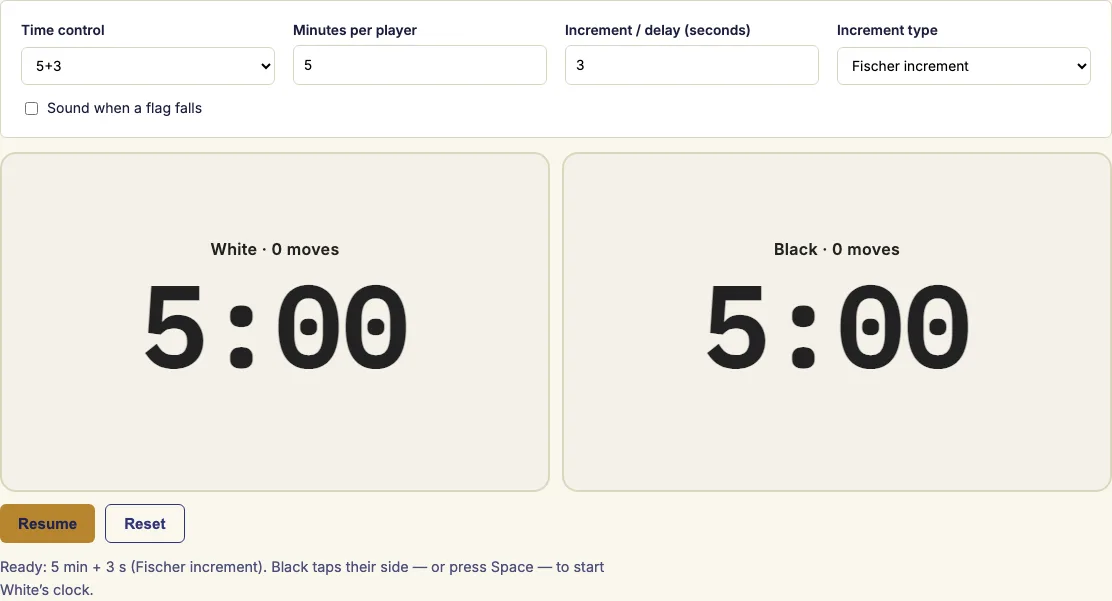
Put your phone, tablet or laptop between the players, pick a time control and tap your side after each move.
A chess clock that runs in your browser
A chess clock is a pair of linked countdown timers that tracks how long each player spends on their moves. This free chess clock runs in your browser with nothing to install. Each player gets a large panel showing their remaining time and the number of moves they have made, so it works as a chess game timer for a game at the board. Use it for a rapid or blitz game, a casual match, or practice playing under time pressure. It works as a chess board clock on a laptop or a phone, and you can set any time control you like.
How to use the chess clock
- Pick a preset such as 5+3 (five minutes per player plus three seconds per move), or type the minutes and seconds yourself.
- Choose the increment type: Fischer, Bronstein delay or simple (US) delay. With 0 seconds, all three are the same plain countdown.
- Black taps their side, or anyone presses Space, to start White's clock.
- After you make your move, tap your own panel. Your time stops and your opponent's clock starts.
- Press Pause to stop both clocks, for example to call an arbiter. Press Resume to continue.
- Press Reset to return both clocks to the starting time.
- When a clock reaches zero, its panel turns red and shows the flag. Tick the sound option first if you want a beep.
On a keyboard, Space ends the turn of the side whose clock is running. Left Shift is White's button and Right Shift is Black's, so two players can share one laptop.
The clock does not decide the result on its own. Whether a flag loses the game depends on the rules you play by, for example whether the opponent still has material to checkmate.
The presets cover the usual time controls, from 1+0 bullet to 90+30 classical. For any other setting, type the minutes and seconds yourself. Under ten seconds, the display switches to tenths of a second. Where the browser supports it, the screen stays awake while a clock is running.
How does a chess clock work?
A chess clock is two linked countdown timers, and only one of them runs at a time. When you finish your move and press your side, your time stops and your opponent's time starts. Each player's total time shrinks only during their own turns, so the clock measures thinking time rather than the length of the game.
This chess clock measures time from the device's high-resolution clock instead of counting timer ticks. That keeps it accurate even when the browser slows down a background tab.
What is the clock rule in chess?
Under FIDE rules, a player whose time runs out loses, unless the opponent cannot checkmate by any series of legal moves. In that case the game is drawn. The clock stops, and the panel of the player whose time ran out turns red and shows the flag.
FIDE rules also say a player must press the clock with the same hand that moved the piece. At the start of a game, White's clock is started.
What does 5+3 mean in chess?
A time control written 5+3 means 5 minutes for each player for the whole game, plus 3 seconds added for every move. The first number is the base time. The second number is the increment, or extra time per move.
The increment can be applied in three ways. With Fischer increment, the three seconds are added after each move you complete, so you can gain time. With simple delay, your clock waits for the delay period before it starts counting down, so a quick move costs nothing. With Bronstein delay, the clock counts down at once, but after your move the time you used is given back, up to the delay. With simple delay and Bronstein delay you can never gain time. This clock applies the increment or delay on every move, including the first.
How do I set the time on my chess clock?
Set two values: the base time for each player and the increment per move. A preset fills both for you. If you need a different setting, type any number of minutes and seconds. Choose the increment type after you set the time.
Time controls that add extra time after a set number of moves, such as 40 moves, are not built in. Use a standard base time with an increment instead.
What are the different types of chess clocks?
Analog, or mechanical, chess clocks show a small flag that falls when the time is up. They cannot add an increment. Digital clocks can add an increment or a delay. This tool is a digital clock with all three increment types.
The time control also names the game type. Under FIDE rules, a blitz game gives each player 10 minutes or less. A rapid game gives more than 10 and less than 60 minutes. Bullet is the informal name for games with less than 3 minutes per player.
Examples
3+2, Fischer increment
White moves after 5 s → 2:57
Black moves after 1 s → 3:01
White moves after 12 s → 2:47
5 min, Bronstein delay 5 s
White moves after 3 s → 5:00
Black moves after 8 s → 4:57
5 min, simple delay 5 s
White moves after 4 s → 5:00
Black moves after 9 s → 4:56
Questions and answers
How to use a chess timer?
Follow the steps above. If you are new to timed play, start with a preset such as 5+3 so you can practise tapping your panel after each move.
Can I use it on my phone?
Yes. The clock runs in your browser, so there is nothing to install. On a phone the panels are stacked, and the top one is turned upside down so the player across the table can read it.
Does the clock need an internet connection?
No. Once the page has loaded, the clock needs no connection. Everything runs on your device, and nothing is sent anywhere.
Will the clock keep accurate time if I switch tabs?
Yes. The clock measures time from the device's high-resolution clock, so it stays accurate even when the browser slows down a background tab.
Can I save my favourite time control?
Yes. The settings are kept in the address, so a bookmark opens the clock with your chosen time control.
Does the increment apply to the first move?
Yes. This clock adds the increment, or applies the delay, on every move, including the first.
Can I set a time control with extra time after 40 moves?
Not with this tool. Time controls that add time after a set number of moves are not built in.
Related chess tools
Updated