 ChessPuzzlePrint
Chess Certificate Maker
Fill in the names and the event, choose a design and print a certificate for every player, or save them all as one PDF.
What the chess certificate maker does
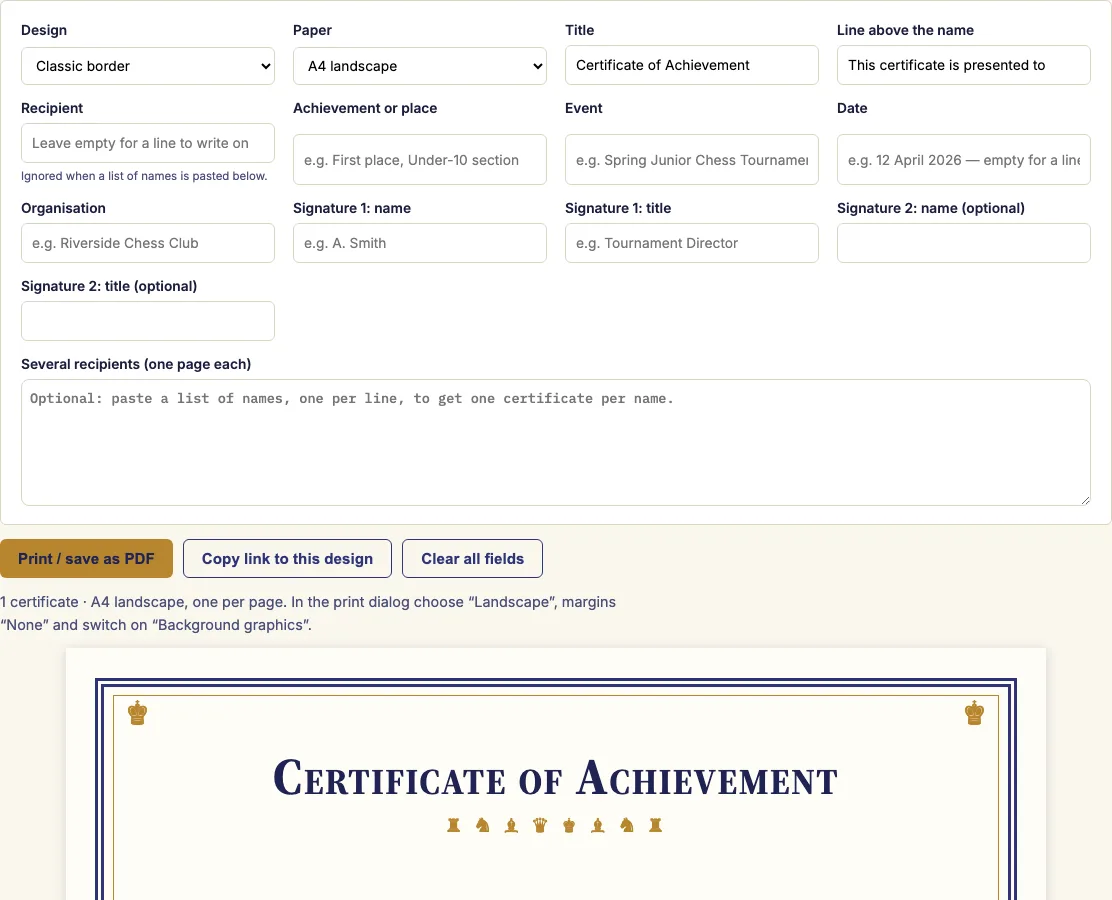
A chess certificate maker is a browser tool that builds printable landscape chess certificates for tournament prizes, club championships, school chess classes and anyone who has just learned to play. It runs in your browser, and nothing you type is uploaded. You choose one of three designs, fill in the title, recipient, achievement, event, date and signatures, and check the preview, which shows exactly what will print. You can make a single certificate or paste a list of up to 300 names and get one page per name. Use it for a chess winner certificate, a chess tournament certificate, or a chess certificate template you can reuse next season.
How to use the chess certificate maker
- Pick one of the three designs: a classic border with gold chess pieces, a modern layout with a chessboard band, or a bright kids' design with large pieces.
- Choose A4 or US Letter. Both print in landscape.
- Type the title, the recipient, the achievement or place, the event, the date and the organisation. Leave any field empty to print a line instead.
- Add one or two signature names and titles, for example the tournament director and the club president.
- For several players, paste their names into "Several recipients", one per line. Each name gets its own page, and blank lines are ignored.
- Check the preview, then press "Print / save as PDF".
- In the print dialog, choose landscape, set margins to none, switch on background graphics so the colours print, and keep the scale at 100 %.
For a tournament, make one batch per prize. Set the achievement to "First place", paste the winners, print, then change it to "Second place" for the next batch. Printing on card or heavier paper makes the certificates sturdier, but check which paper weights your printer accepts. The link in the address bar stores the design and every field except the list of names, so next season's certificates start from the same settings. The certificates you make here are free to use for your own events or in products you sell, such as Etsy templates.
How do I make a chess certificate?
A chess certificate names who earned it, what they earned, and where and when it happened. The maker keeps these as separate fields, so you can change the event or date for the next competition without retyping the rest of the certificate.
Each field is a piece of information that a formal certificate normally carries. Signatures add the people who authorise it, usually the person running the event and a club or school officer. Together these fields turn a blank layout into a complete record of the achievement.
How many names can one list hold?
The list takes up to 300 names, one per line, and each name becomes one landscape page. Blank lines are ignored, so gaps in a pasted list do no harm. For a longer list, split the names into batches and print each batch on its own.
Which chess certificate design should I pick?
The design should match the audience, not the paper. The classic border with gold chess pieces suits prizes and championships, where a formal look fits the occasion. The modern layout with a chessboard band suits adult club events and open tournaments. The bright kids' design with large pieces suits school classes and young beginners.
What happens if I leave a field empty?
An empty field is not left blank on the page. It becomes a printed line where you can write by hand. This lets one design serve two jobs: printed names for a finished list of winners, and blank certificates you fill in at the prize-giving.
Why does the preview matter?
The preview shows what will print, at any screen size. Checking it before you print catches spelling mistakes in names and wrong dates, which are easy to miss on a screen but expensive to reprint on card.
Which paper size should I choose?
Pick A4 or US Letter to match the paper in your printer. The page is landscape either way, and the print size is set automatically, so you do not need to resize the design yourself.
Examples
Questions and answers
Can I download it as a PDF?
Yes. Press "Print / save as PDF", then choose "Save as PDF" as the printer. The file keeps the same layout as the preview, so you can keep a copy or send the certificates by email.
Is it a template I can edit?
Yes. The design, the fields and the signatures all stay as you set them. The link in the address bar keeps everything except the list of names, so you can reopen it and change only the event, date or recipients.
Can I print several at once?
Yes. Paste up to 300 names, one per line, and each name prints on its own landscape page in one go. Keep the scale at 100 % in the print dialog so each certificate fills its page correctly.
Is anything uploaded when I make a certificate?
No. Everything is made in your browser and nothing you type is uploaded, so the names on your list are not sent to a server.
Why do my certificate colours not print?
Most browsers leave out background colours unless "Background graphics" is switched on in the print dialog. Turn it on, and the design colours should print. Print settings in your browser have the final say over what appears on paper.
Are these chess certificates free for commercial use, for example in a tournament pack I sell?
Yes. The certificates you create are royalty-free for personal, school, club and commercial use, including Etsy templates, Teachers Pay Teachers packs and print-on-demand. No credit is required, and the only thing you may not do is copy this generator itself to run a competing service.
Related chess tools
Open-source components used by this tool: Noto Sans Symbols 2 chess glyphs (ChessPieces font) (OFL-1.1).
Updated