 ChessPuzzlePrint
Chess Board Setup
See where every piece goes, practise placing all 32 on an empty board, and print the setup as a one-page sheet.
What the chess board setup guide does
The chess board setup guide is an interactive page that shows you how to set up a chess board, from an empty board to the full starting position. It runs in your browser, nothing is uploaded, and it works on a phone. The Step by step tab walks you through the placement of every piece, the Practice tab lets you set up the pieces yourself and check the result, and the Print tab creates a setup sheet you can print. The guide also covers the rules of placement, the names of the pieces and the colour of each square, so you can set up a board correctly before your first game.
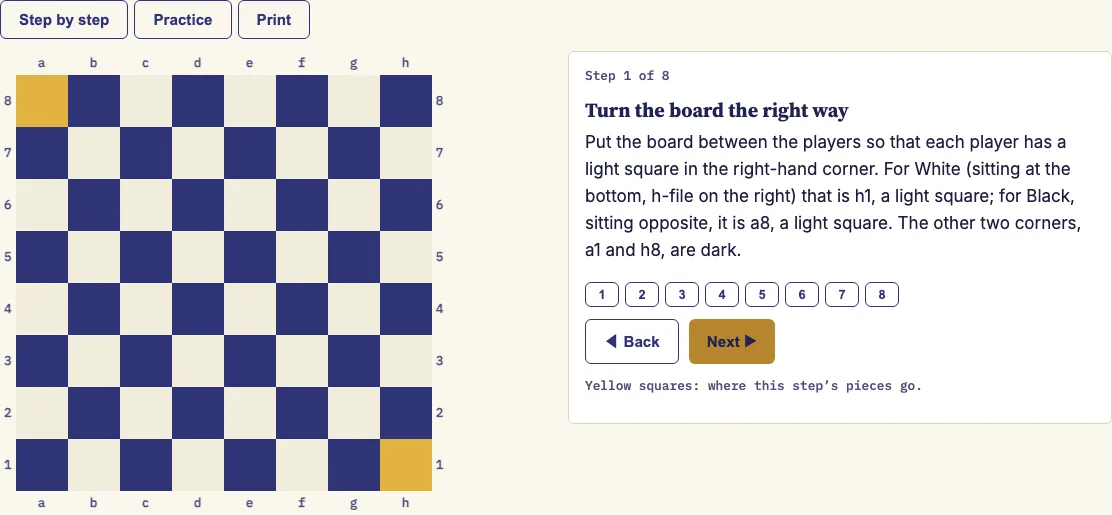
How to use the Chess Board Setup Guide
- Open the Step by step tab. The board shows files a–h and ranks 1–8 around its edge.
- Press Next ▶ to move through the eight steps, and ◀ Back to return to the previous one.
- Press a numbered button from 1 to 8 to jump straight to that step. The squares for the current step are shaded yellow.
- Open the Practice tab. Click a piece in the palette, then click a square to place it. Use the Eraser to remove a piece.
- Set Board orientation to White at the bottom or Black at the bottom, depending on which side you are playing.
- Press Check my setup. Correct squares turn green. Wrong, missing or extra squares turn red, and the status line tells you how many squares are correct.
- If you get stuck, press Show answer to fill in the correct position, or Clear board to start again.
- Open the Print tab, choose A4 or US Letter, and press Print setup sheet. Only the sheet is printed.
The timer ("Time: m:ss") starts when you make your first placement and stops when the setup is perfect or you press Show answer. The counter "Pieces on the board" shows how many of the 32 pieces you have placed. The setup sheet you print here is free to use in class or in products you sell, such as KDP workbooks.
How do you set up a chess board?
Turn the board so that each player has a light square in the right-hand corner. Then place the pieces on the two ranks nearest each player, with the pawns in front of the other pieces. Work through the placement in a fixed order so that nothing is missed.
Once the light square is in the right-hand corner, start in the corners: White's rooks go on a1 and h1, and Black's rooks go on a8 and h8. Next, add the knights, bishops, queens and kings, and finish with the eight pawns on each side.
What is the correct chess board setup?
The correct setup is the starting position. Each side has 16 pieces: one king, one queen, two rooks, two bishops, two knights and eight pawns. That makes 32 pieces in total.
Read the back rank from the a-file to the h-file. For White on rank 1 the order is rook, knight, bishop, queen, king, bishop, knight, rook. Black's back rank on rank 8 uses the same order. The eight pawns of each side stand on the rank in front of their back rank: a2 to h2 for White and a7 to h7 for Black.
What are the chess board setup rules?
A chess board has 64 squares arranged in 8 ranks (rows 1 to 8) and 8 files (columns a to h). The ranks are numbered from White's side, so White sits on ranks 1 and 2 and Black sits on ranks 7 and 8. Every square has a name made from its file letter and its rank number, such as e4 or g7.
Square colours are fixed. a1 and h8 are dark, and h1 and a8 are light. Each side has one bishop on a light square and one on a dark square, which is why the two bishops of each side are never on the same colour. White always moves first.
Does the king go on the right or left?
The king goes on e1 for White and e8 for Black. It is never placed on the d-file, because the queen takes that square. The two queens face each other on the d-file, and the two kings face each other on the e-file.
Seen from White's side, the king is to the right of the queen. The queen takes the square of her own colour, so the White queen goes on the light square d1 and the Black queen goes on the dark square d8. Once the queens are on their correct squares, the kings are the only pieces left to place on the back rank.
Are you setting up your chessboard wrong?
You are probably setting up the board wrong if the corner squares are the wrong colour. A correct board has a light square at h1 and a8, so the White rook on h1 sits on a light square. If the rook on a1 is on a light square, the board is turned around.
Other common mistakes include swapping the king and the queen, placing both bishops on squares of the same colour, and placing the pawns on the same rank as the other pieces. Use Practice mode and press Check my setup. Red squares show the wrong, missing or extra pieces, and the status line tells you how many squares are correct.
What are the chess pieces names?
The six piece types are the king, queen, rook, bishop, knight and pawn. The king is the most important piece, and the game ends when it is checkmated. The queen is the most powerful piece on the board.
Rooks stand in the corners, knights stand beside them, bishops stand beside the knights, and pawns fill the front rank. The Practice palette shows all 12 pieces, six for each colour.
Examples
Questions and answers
Can I print a chess setup sheet?
Yes. Open the Print tab, choose A4 or US Letter, and press Print setup sheet. The sheet includes a large diagram of the starting position with coordinates, a table of every piece and its starting squares for each side, and the eight steps.
Who moves first in chess?
White always moves first. Black moves second, and the players then alternate turns until the game ends.
How many pieces are on a chess board at the start?
There are 32 pieces at the start, 16 for each side. The counter in Practice mode shows "Pieces on the board" out of 32 as you place them.
Does the timer start automatically?
No. The timer starts only when you make your first placement in Practice mode. It stops when your setup is perfect or when you press Show answer.
Can I set up the board from Black's side?
Yes. In Practice mode, change Board orientation to "Black at the bottom". The position stays the same, but the board is shown from Black's point of view.
Does the guide work on a phone?
Yes. Everything runs in the browser, and the guide works on a phone. Nothing is uploaded to a server.
Do I need to create an account to use the guide?
No. There is no account or sign-up: open the page and start with the Step by step tab.
Can I use the chess setup sheet commercially, such as in a chess workbook for KDP?
Yes. The setup sheet you print is royalty-free for personal, classroom and commercial use, including KDP workbooks, Etsy printables and Teachers Pay Teachers. No credit is required, and the only thing you may not do is copy this generator itself to run a competing service.
Related chess tools
Open-source components used by this tool: ChessPieces font (Noto Sans Symbols 2 subset) (SIL OFL 1.1).
Updated